See 3D Building Models
Directly on Your Jobsite.
True spatially registered BIM AR for active jobsites. Lock your standard 3D IFC models directly onto physical columns, walls, and MEP penetrations with sub-centimeter accuracy. No floating drift, no web dashboards, and zero cloud conversions.
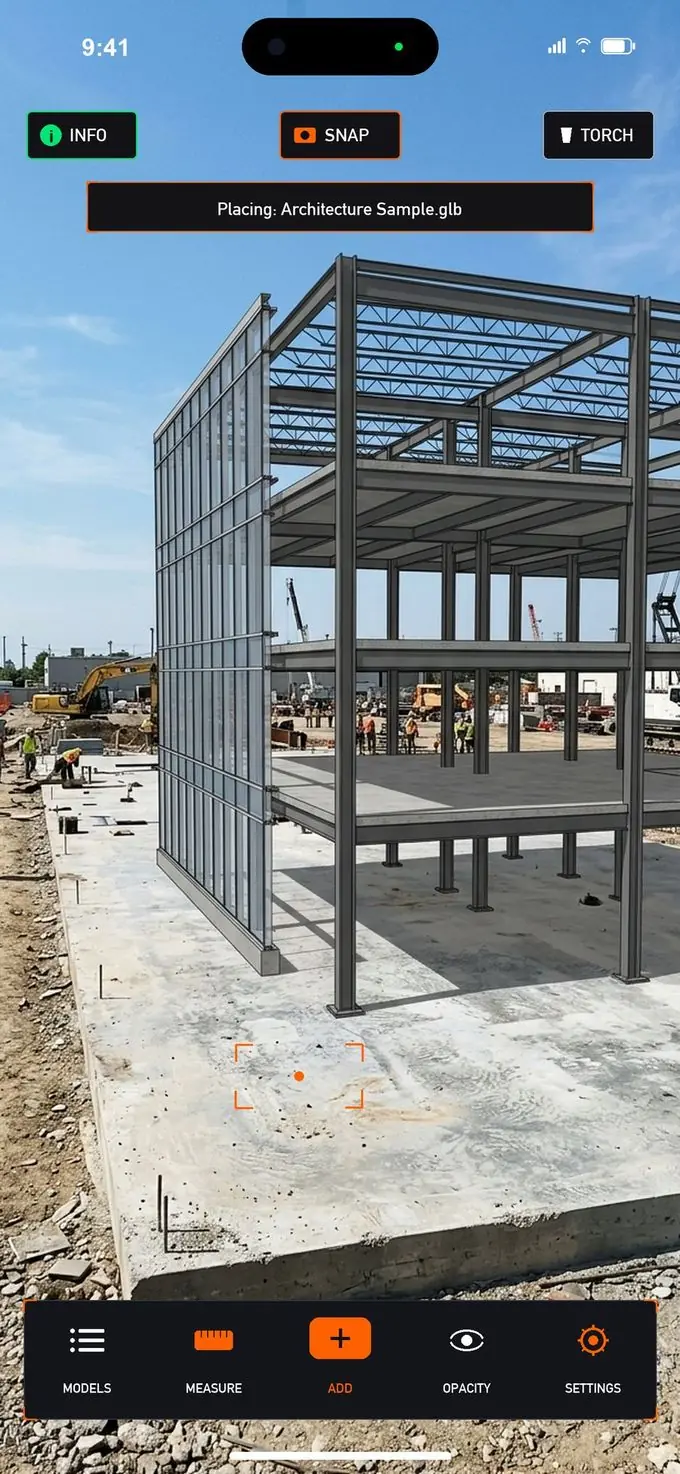
OnsiteBIM 1:1 Scale AR Jobsite Walkthrough Simulation
Experience how OnsiteBIM works on an active construction site. Mount the printed Alignment Target on a physical concrete column, point your smartphone camera, and see your standard 3D IFC building model snap into sub-centimeter 1:1 scale registration. Walk through the space to inspect overhead HVAC ductwork, chilled water hydronics, fire sprinklers, cable trays, and interior layouts with real-time BIM transparency and trade layer filtering.
How It Works in 3 Simple Steps
Select your model, load it on your device, and snap to your jobsite coordinates in seconds.
Mount Alignment Target on Site
Stick or mount your printed OnsiteBIM Alignment Target at a column grid intersection or benchmark on site.
.ifc models containing your project coordinate origin.
Load Your 3D Model
Open OnsiteBIM and select your .ifc model from local device storage or company cloud (Google Drive, OneDrive, Files).
Aim & Inspect at 1:1 Scale
Point your camera at the Alignment Target. Your loaded model snaps into place at 1:1 scale for clash checking and measuring.
If It Can Be Modeled in Revit, It Can Be Inspected in OnsiteBIM
From pre-pour concrete sleeves and MEP clash detection to interior fit-out and as-built tolerance verification—inspect every building element at true 1:1 scale on site.
As-Built Comparison & Deviation Check
Measure actual field placement against planned BIM design coordinates. Point your camera at installed work and use the in-world 3D tape measure to verify construction deviations (Δx, Δy, Δz) against project tolerances in seconds.
- Live point-to-point 3D clearance tape measuring
- Verify tolerances (±5mm to ±10mm) before sign-off
- Prevent costly core drilling and structural rework
HVAC Ducts, Piping & Electrical
Stop explaining 3D models over screen-share video calls while foremen hold phones up to the ceiling. Field crews open your MEP model in OnsiteBIM on their own phone, aim at the column target, and look up to see full-scale 3D ducts, piping connections, and valves in real space.
- 1-click MEP ONLY layer isolation
- Eliminate frustrating screen-share video calls with field crews
- Replace confusing 2D shop drawings for complex connections
- Verify pipe falls, hanger clearances & valve access
Concrete Columns, Sleeves & Rebar
Inspect pre-pour structural decks before concrete trucks arrive. Check rebar clearance, post-tension tendon profiles, slab edge forms, pipe sleeves, and blockouts with sub-centimeter accuracy.
- Pre-pour sleeve audit to eliminate destructive slab coring
- Verify rebar cover and embed plate positioning
- Inspect column dowel centers and elevator core geometry
Structural Steel & Anchor Bolts
Superimpose wide-flange steel columns, beams, cross-bracing, and roof trusses over anchor bolt clusters and bearing plates. Confirm crane pick clearances before steel arrives on site.
- Verify anchor bolt cluster centers before grouting baseplates
- Check crane hook clearances and steel erection sequence
- Audit connection gussets and bracing clearances
Fire Sprinklers & Life Safety
Verify fire protection mains, branch lines, and pendant sprinkler head drops against ceiling framing and HVAC ductwork. Ensure code-compliant spray patterns (NFPA) without head obstructions.
- Verify upright/pendant sprinkler head spray clearances
- Audit standpipe runs and fire damper wall sleeve openings
- Prevent ductwork from shielding required sprinkler coverage
Façade, Curtain Wall & Embeds
Verify concrete edge embed plates (Halfen channels) and anchor brackets before factory-built unitized glass panels and louvers arrive on site, preventing costly crane delays.
- Confirm slab-edge embed plate alignment within millimeters
- Inspect curtain wall mullion anchor locations
- Audit architectural louvers and spandrel glass clearances
Drywall, Partitions & Ceilings
Project wall stud track layouts onto bare concrete slabs before framing begins. Inspect ceiling grids, door/window rough openings, architectural millwork, and custom casework at 1:1 scale.
- Verify partition wall track layout on raw slabs before framing
- Check ceiling heights, bulkheads & light cove details
- Audit rough door and borrowed light wall openings
Underground Utilities & Stub-Ups
Inspect sub-slab sanitary drainage lines, electrical duct banks, grease traps, and plumbing stub-ups before pouring slab-on-grade (SOG), ensuring pipes emerge inside future walls.
- Ensure plumbing and conduit stub-ups land inside future walls
- Audit grade beams and underground retention tanks
- Prevent jackhammering fresh slabs to relocate missed pipes
Built for Real Jobsites & Real People
Powerful features made simple enough for anyone to inspect construction quality in minutes.
Sub-Centimeter Alignment Target Placement at 1:1 Scale
The OnsiteBIM Alignment Target is used strictly for precise real-world placement, orientation, and 1:1 scale alignment—and explicitly works off standard OpenBIM .ifc files. Because the target does not lock you into a single hardcoded drawing, you can mount an Alignment Target once on a jobsite column and use it to align any trade discipline model (MEP, structural, architectural) or latest revision at true 1:1 scale.
- Works Off .IFC BIM Models: Alignment Target auto-placement explicitly reads coordinate origins directly from standard
.ifcfiles. - Dedicated Placement & Alignment: The target establishes physical coordinates—giving you total freedom to load whichever model or revision you need.
- Sub-Centimeter True Alignment: Calculates exact position, elevation, and orientation in milliseconds.
- Rock-Solid Site Anchor: Models stay rigidly locked in place as you walk around the floor.
- 100% On-Device Autonomy: Zero internet connection or cloud processing required on the field.

Instant 3D Clearance & Surface Tape Measure
Measure physical corridor widths, slab elevations, and equipment clearances in 3D AR space with millimeter surface accuracy. Real-time laser targeting lets you verify field conditions against design tolerances in seconds.
- Instant Dual Readouts: Live simultaneous readouts in both metric meters (2.40 m) and imperial feet & inches (7' 10").
- Dedicated Measurement HUD: Built-in Undo, Clear, and Done controls with high-contrast tactile buttons.
- Surface Snap Targeting: Locks precisely onto physical concrete slabs, walls, and digital model geometries.
- Jobsite-Ready Touch UI: Large touch targets designed for quick operation with work gloves.

Dynamic 3D Model Transparency & Inspection
Inspect concealed MEP utilities, ductwork, and conduit with dynamic real-time model transparency. Use the responsive dark-glass HUD slider to smoothly blend digital 3D models over active jobsite environments from 0% to 100%.
- Smooth Real-Time Slider: Seamlessly fade 3D BIM models over live camera feed to verify pipe & duct alignments.
- One-Tap Quick Presets: Instantly snap to 25%, 50%, 75%, or 100% transparency with work gloves.
- Rock-Solid Anchoring: Keep models firmly pinned to the floor and walls while adjusting visibility.
- Detect Clashes Early: Catch MEP and structural discrepancies before drywalling and concrete pours.

Millimeter Grid Fine-Tuning & Elevation Controls
Need to fine-tune placement or inspect models without a physical target? OnsiteBIM gives you intuitive on-screen touch controls to nudge models along building grid lines or lock elevation to slab grade with millimeter accuracy.
- Grid Axis Navigation: Smoothly nudge models along building grid lines (X and Y axes).
- 10mm Stepping Controls: Step in calibrated increments for exact millimeter adjustments.
- Dedicated Adjustment Modes: Intuitive touch controls for Move, Rotate, Elevate, and Scale.
- Elevation Leveling Lock: Lock height while adjusting horizontally to keep models pinned to true slab grade.

Universal Device Compatibility
OnsiteBIM runs on the standard iPhone, iPad, or Android phone already in your pocket. 100% on-device processing with zero external hardware required.
| Platform Capability |
Apple iOS & iPadOS
Requires iOS 16.0 or newer
|
Google Android
Requires Android 10.0+ (ARCore)
|
|---|---|---|
| Supported Hardware | iPhone 11 through 17 series, iPad Air, iPad mini & iPad Pro | Smartphones & tablets with Google Play Services for AR |
| 1:1 Target Coordinate Alignment | ✓ Sub-centimeter optical alignment datum lock | ✓ Sub-centimeter optical alignment datum lock |
| Millimeter Controls & 3D Tape | ✓ Elevation lock, grid nudge & tape readout | ✓ Elevation lock, grid nudge & tape readout |
| Real-Time Model Transparency | ✓ 0%–100% dark-glass opacity HUD slider | ✓ 0%–100% dark-glass opacity HUD slider |
| Wall & Column Depth Occlusion | ✓ Hardware Apple LiDAR mesh on Pro models | ✓ ARCore Depth API on supported hardware |
| 100% Offline & On-Device | ✓ No cellular, Wi-Fi, or cloud servers needed | ✓ No cellular, Wi-Fi, or cloud servers needed |
| Storage & Cloud Support | ✓ Apple Files, AirDrop, Google Drive, OneDrive & local storage | ✓ Google Drive, Microsoft OneDrive, Dropbox & local downloads |
Jobsite & BIM Workflows Answered
Everything contractors, BIM managers, and project engineers need to know about using OnsiteBIM on active jobsites.
No. OnsiteBIM operates 100% on-device without requiring an internet connection or cellular signal. All 3D model rendering, camera tracking, and Alignment Target recognition execute locally on your iPhone, iPad, or Android device. Your proprietary BIM models are processed entirely in local memory and never leave your hardware.
The OnsiteBIM Alignment Target acts as a physical coordinate datum matching the origin point set in your BIM model. In OnsiteBIM, you load your standard OpenBIM .ifc or 3D CAD model directly from your device storage or company cloud (Google Drive, OneDrive, Dropbox). When you aim your camera at the printed Alignment Target, the app instantly snaps the model onto the physical jobsite at true 1:1 scale with sub-centimeter mathematical precision.
OnsiteBIM natively supports the OpenBIM .IFC standard (IFC 2x3 and IFC4) with zero file conversion. You can export directly from Autodesk Revit, Graphisoft ArchiCAD, Tekla Structures, SolidWorks, Vectorworks, Blender, and Rhino. In addition to IFC, OnsiteBIM supports .GLB / .GLTF, .USDZ, .OBJ, and .STL formats.
OnsiteBIM runs on iPhones and iPads running iOS 16+ and Android devices running Android 10+ with ARCore support. All core inspection capabilities—including 1:1 scale target alignment, dynamic layer opacity, 3D clearance tape measuring, and millimeter grid fine-tuning—work smoothly across all supported hardware without needing special external equipment. On Apple LiDAR devices (iPhone Pro and iPad Pro) and depth-capable Android devices, hardware depth sensing adds real-time physical wall and column masking.

Ready to Try OnsiteBIM?
Download OnsiteBIM for iOS or Android and start inspecting 3D BIM models at true 1:1 scale on site.
